
 Website audit
 SEO audit
 Technical audit
 UX & Conversion audit
 AI/LLM Visibility audit
 Ecommerce audit
CMS Audits Built Around How Your Platform Works
Generic audits miss platform-specific problems. WordPress, Shopify, and Webflow each create their own technical debt - plugin conflicts, duplicate URLs, taxonomy issues, theme-generated bloat. We audit the platform internals, not just what's visible on the surface.
- Plugin & Theme Analysis
- Indexing & Sitemap Checks
- Duplicate Content Detection
- Platform-Specific SEO Fixes
- Core Web Vitals Review
- Heading Structure Audit
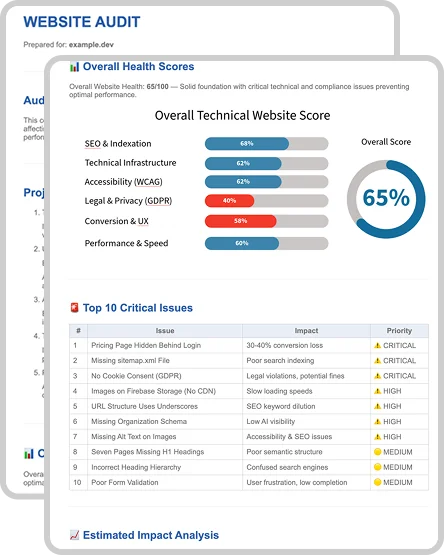
WordPress SEO Audit
WordPress comes with its own recurring SEO problems - Yoast misconfiguration, plugin conflicts, taxonomy duplicates, permalink issues, and heading structure broken by page builders. We check all of it manually and tell you exactly what to fix.
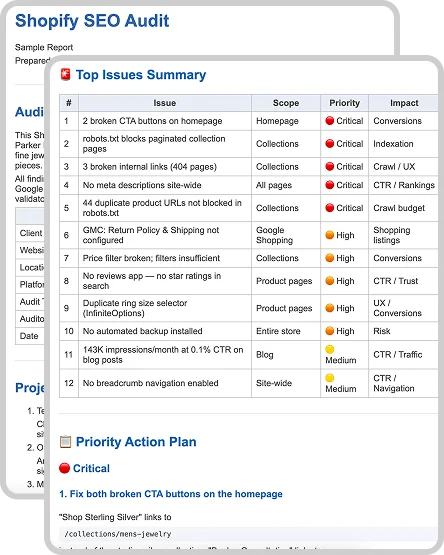
Shopify SEO Audit
Shopify creates its own recurring SEO problems - duplicate product URLs across collections, broken canonical logic in theme liquid, app conflicts generating invalid schema, and faceted navigation polluting the index. We check all of it manually and tell you exactly what to fix.
Get a FREE Expert Review of Your Website
Manual review by a real SEO expert. No AI. Delivered within 24 hours.
- Manual review
- Personalized findings
- 24h delivery
Frequently Asked Questions
Why does the platform matter for an SEO audit?
Each platform creates different technical problems. WordPress generates issues around plugin conflicts, taxonomy duplicates, and permalink structure. Shopify has its own URL constraints and duplicate collection pages. A platform-specific audit targets exactly these issues instead of running a generic checklist.
What platforms do you audit?
We audit all major CMS platforms and site builders - WordPress, Shopify, Webflow, Wix, Squarespace, and custom builds. If your site runs on a CMS, we can audit it. Reach out with your platform and we'll confirm scope and timing.
Do you need access to wp-admin or the backend?
It depends on the scope. If the audit covers plugin configuration, internal settings, or how the CMS manages indexing and sitemaps - yes, we'll need read-only backend access to review the current setup. We identify what's misconfigured and explain what needs to be fixed. Implementing the changes is a separate service.
How is a platform audit different from a standard SEO audit?
A standard SEO audit reviews what's visible - rankings, meta tags, backlinks. A platform audit goes deeper: we check how the CMS itself generates URLs, handles canonicals, manages sitemaps, and produces technical issues specific to that platform's architecture. The fixes are platform-specific - no vague recommendations, just steps that work in your actual admin panel.
How long does the audit take?
5-7 business days for the full audit. The free Express Audit is delivered within 24 hours and shows the most critical issues on your site.