SEARCH ENGINE OPTIMIZATION (SEO) AUDIT
Prepared for: example.com
Audit Overview
This comprehensive SEO and technical audit was conducted for example.com in November 2025 to identify critical issues affecting search visibility, AI discoverability, and website performance.
Project Objectives
- Technical Barriers Analysis
Identify indexation issues, technical errors, and infrastructure problems preventing optimal search engine visibility. - AI Search Optimization Assessment
Evaluate visibility in AI-powered platforms (ChatGPT, Perplexity, Google SGE) and assess schema markup implementation for AI comprehension. - Traffic Quality Evaluation
Investigate geographic traffic patterns, determine authenticity, and analyze user behavior to identify potential bot activity or anomalous patterns. - Performance & Conversion Review
Assess website speed, user experience, security implementation, and conversion optimization opportunities.
Key Findings
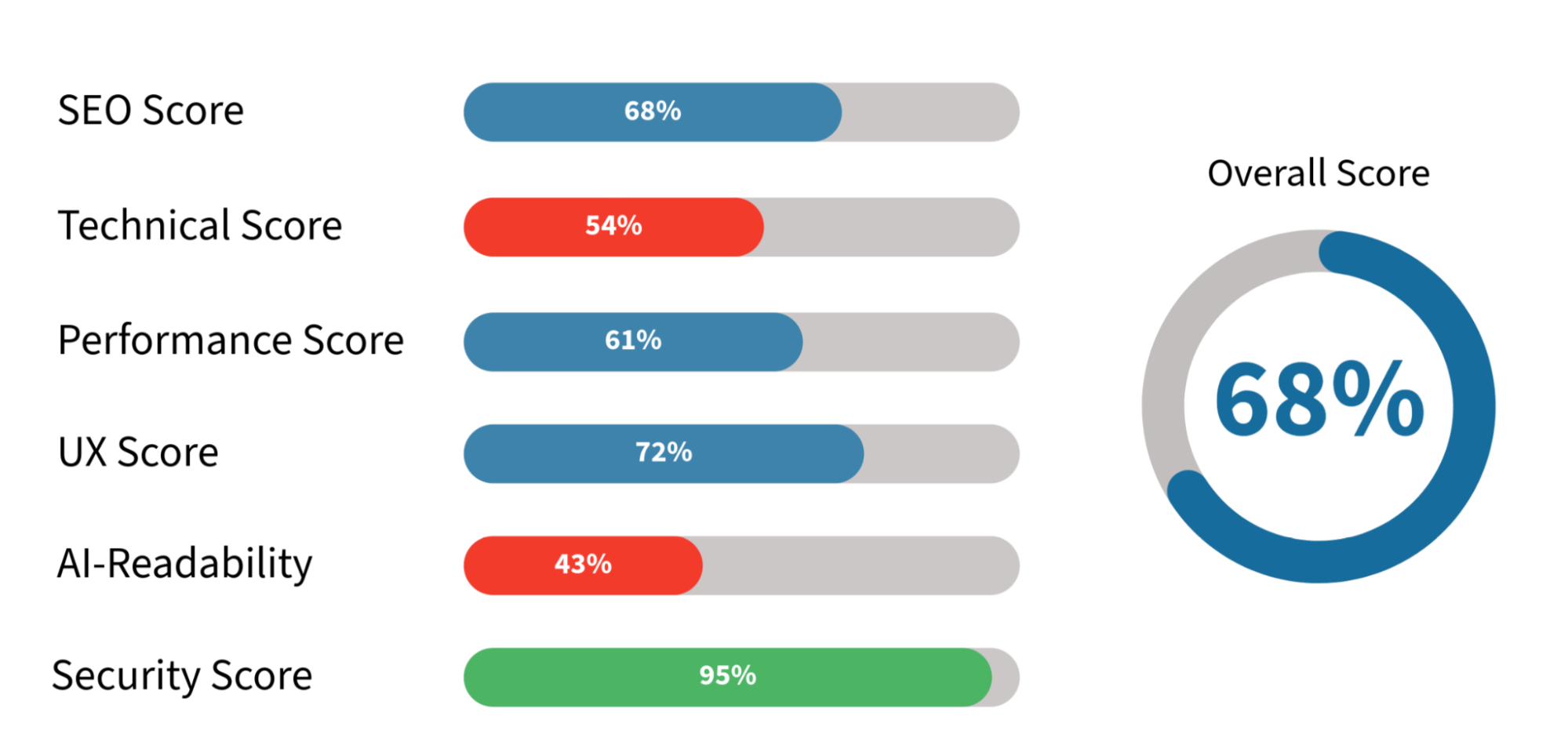
Overall Health Score: 68/100 - Solid foundation with critical technical barriers preventing optimal performance.
- Critical Issues Identified:
- Pricing page hidden behind login (30-40% conversion loss)
- Missing sitemap.xml file (poor indexation)
- Minimal schema markup (low AI visibility)
- Images on xxxx without CDN (slow loading)
- URL structure using underscores vs hyphens
- Positive Aspects:
- Excellent security (xxxx/100, A+ SSL rating)
- Strong backlink profile (xxxxxx backlinks, Authority Score xx)
- Top keyword ranking (#1 for "xxxxx xxxxxx")
- Traffic Assessment:
- Geographic traffic shows legitimate user engagement with normal behavioral patterns. No evidence of bot traffic detected.
Expected Impact
- Quick Wins (4 weeks): +25-30% conversion improvement, +15% indexation
- Medium-term (12 weeks): +40% AI visibility, +20-25% organic traffic
- Long-term (6 months): +35-40% sustained traffic growth
📊 Overall Health Scores
🚨 Top 10 Critical Issues
| # | Issue | Impact | Priority |
|---|---|---|---|
| 1 | Pricing Page Hidden Behind Login | 30-40% conversion loss | ⚠️ CRITICAL |
| 2 | Missing sitemap.xml File | Poor search indexing | ⚠️ CRITICAL |
| 3 | Images on xxxxx Storage (No CDN) | Slow loading speeds | ⚠️ HIGH |
| 4 | URL Structure Uses Underscores | SEO keyword dilution | ⚠️ HIGH |
| 5 | Missing Organization Schema | Low AI visibility | ⚠️ HIGH |
| 6 | Seven Pages Missing H1 Headings | Poor semantic structure | 🟡 MEDIUM |
| 7 | Incorrect Heading Hierarchy | Confused search engines | 🟡 MEDIUM |
| 8 | No FAQ or About Us Pages | Low trust, poor AI indexing | 🟡 MEDIUM |
| 9 | Meta Descriptions Missing (6 pages) | Lower CTR in search | 🟡 MEDIUM |
| 10 | Mobile Performance Score: 60/100 | Poor mobile UX | 🟡 MEDIUM |
📈 Estimated Impact Analysis
Based on industry benchmarks and similar website improvements:
- Traffic Impact Potential:
- Opening pricing page typically increases conversions by 20-35%
- Technical SEO fixes commonly improve organic traffic by 15-30%
- Schema markup implementation shows 10-20% visibility increase in AI search
- Mobile optimization typically reduces bounce rate by 8-15%
- Timeline Expectations:
- Quick wins visible: 2-4 weeks (pricing, sitemap, H1 fixes)
- Technical improvements: 6-10 weeks (performance, images, CDN)
- Full impact realization: 12-16 weeks (content, backlinks, rankings)
- Comparable Cases:
- Similar SaaS websites saw average traffic increase of 35% after technical audit implementation
- Conversion rates improved by 25% average when pricing became accessible
- AI search visibility increased 40% average with proper Schema markup
Note: Actual results depend on implementation quality, market conditions, and ongoing optimization efforts.
✅ Recommended Action Plan
Phase 1: Quick Wins (Week 1-2)
- Open pricing page to all users
- Create and submit sitemap.xml
- Add missing H1 headings (7 pages)
- Add Organization Schema to homepage
- Fix broken links (5 URLs)
- Add meta descriptions to missing pages
- Update robots.txt configuration
Phase 2: Technical Foundation (Week 3-6)
- Implement Cloudflare CDN
- Move images from Firebase to hosting
- Optimize images (WebP, lazy loading)
- Fix URL structure (underscores to hyphens)
- Implement 301 redirects
- Optimize mobile performance
- Create About Us + FAQ pages
- Fix heading hierarchy
Phase 3: Content & Growth (Week 7-12)
- Expand articles to 800+ words
- Add comprehensive Schema markup
- Implement proper multilingual structure
- Add Table of Contents to articles
- Build backlink strategy
SECTION 1: SEO AUDIT

1.1 Broken Links Check
Status: 🔴 Critical Issue
Priority: CRITICAL
404 Errors Found (5 broken links):
Broken links found, it is necessary to remove links to these pages from internal pages:
- https://example.com/articles/xxx_xxx_xxx
- Linked from:
- https://example.com/articles/xxx_xxx_xxx_xxx
- https://example.com/articles/xxx_xxx_xxx
- Linked from:
- https://example.com/articles/xxx_xxx_xxx_xxx
- https://example.com/articles/xxx_xxx_xxx
- Linked from:
- https://example.com/articles/xxx_xxx_xxx_xxx
- https://example.com/articles/xxx_xxx_xxx_xxx
- Linked from:
- https://example.com/articles/xxx_xxx_xxx_xxx_xxx
- https://example.com/articles/xxx_xxx_xxx_xxx
- Linked from:
- https://example.com/articles/xxx_xxx_xxx_xxx
Action Required:
- Remove or update all internal links pointing to these 404 pages
- Consider creating301 redirects if these pages should exist
- Implement regular broken link monitoring
1.2 URL Structure Analysis
Status: 🔴 Critical Issue
Priority: HIGH
Problem:
The website currently uses underscores in URLs (example - https://example.com/xxxx/customize_your_xxxx), which is considered bad practice for SEO compared to hyphens (https://example.com/xxxx/customize-your-xxxx).
Google and other search engines perceive hyphens (-) as word separators, while underscores (_) are seen as connectors, meaning "customize_your_xxxx" will be treated as one long word "customizeyourxxxx". This worsens URL readability for search engines and reduces relevance for key phrases.
Action Required:
It is necessary to change URL addresses and set up 301 redirects from old URLs to new ones.
Example transformation:
- Old: /xxxx/customize_your_xxxx
- New: /xxxx/customize-your-xxxx
1.3 Meta Titles Analysis
Status: 🟡 Needs Improvement
Priority: HIGH
Current Issues:
Meta Title remains one of the important parameters for indexing and ranking website pages. It should contain keywords and be no longer than 64 characters, and convey the page's meaning.
Homepage Title Issue:
The Meta Title for the homepage needs improvement - it's recommended to place the keyword (phrase) at the beginning, as this carries maximum semantic weight and is the first thing users see in search results.
Meta Titles Analysis
Screenshot placeholder
- Current Title: example.com - xxxx xxxx xxxxxxx
- Optimized Title: xxxx xxxx xxxxx - example.com
Recommendation: Use example.com at the end of each Title to increase uniqueness and brand recognition.
Article Title Optimization:
Add keywords to article Titles where possible. For example, on the page:
- Current Title: xxxxx xxx xxxx xxxx xxxx xxxx in example.com
- Optimized Title: How to Create Your xxxx xxxxx xxxx - example.com
Action Items:
This principle should be used to check search queries for other articles and optimize them.
1.4 Meta Descriptions Analysis
Status: 🟡 Needs Improvement
Priority: MEDIUM
Current Issues:
Meta Descriptions are less important than Titles but also matter for SEO and CTR in search. They should describe page content.
Example page: https://example.com/articles/xxx_xxx_xxx_xxx_xxx
- Current Description: Yes - you xxxx xxxx your example.com videos in personal and xxxxx xxxx. Here's what that xxxx and how it works.
- Optimized Description: Use your example.com xxx freely in personal and commercial projects. Create xxxxxx xxxxx xxxxx for Resourcess, presentations, marketing, and online courses without restrictions.
Pages Missing Descriptions (6 pages):
Need to create optimized Descriptions for each website page. Also, there are pages without Descriptions that need descriptions added.
- https://example.com/privacy
- https://example.com/contacts
- https://example.com/xxxxx
- https://example.com/xxxx
- https://example.com/xxx
- https://example.com/terms
Action Required:
- Create optimized descriptions for each website page
- Add descriptions to all missing pages
- Include relevant keywords and calls-to-action
- Keep descriptions between 150-160 characters
1.5 Keyword Analysis
Status: 🟢 Good Foundation
Priority: MEDIUM
Current Performance:
Site indexed for large number of keywords. The site shows strong performance for certain queries, particularly "xxxxxxx xxxx" where it ranks in position1 in some regions.
Recommended Strategy:
Recommend highlighting following keywords:
- Most relevant for business
- Keywords with high search frequency
- Those where site already has search positions
For each important keyword need to:
- Prepare separate quality content (article or section)
- Optimize internal pages for these keywords
- Include keywords in Title, Description, H1, and also within content and Schema markup services (for example, use keyword in Article and WebPage Schema).
Example:
"xxxxx xxxx" --- keyword with position11, has very high competition.
To improve position worth adding this word to homepage content, to article, and also create quality backlinks with this word in anchor.
Similarly work with each important keyword.
Expected Result: This approach will increase site relevance for target queries, improve positions and organic traffic. Special attention should be paid to competitive keywords with position10-30 in search results, as their optimization gives maximum traffic increase.
1.6 Content Quality Analysis
Status: 🟡 Needs Improvement
Priority: MEDIUM
Example Page Analysis:
Consider content on page https://example.com/articles/xxx_xxx_xxx - overall content well structured, informative and user-friendly - has detailed feature descriptions and instructions for using basic settings.
However from SEO and Google optimization perspective, content needs improvement:
Content Quality Analysis:
Pros:
- Clear and logical structure: article describes each video customization parameter in separate short paragraph.
- Use of subheadings and highlights for important parts (feature names and options).
- User-oriented text: step-by-step recommendations and motivating final paragraphs ("Don't be afraid to experiment!").
Improvement Recommendations:
- Expand Feature Descriptions
For each parameter add detailed paragraph: why/who needs it, when best to apply, what usage scenarios. - Add More Thematic Keywords
"xxxxx xxxx xxxxx xxxx", "Best settings for xxxxx xxxxx xxxxx", "How to use customization xxxx" etc. Use synonyms and expand phrases for long-tail SEO. - Add FAQ and Case Studies
"Frequently Asked Questions" section: about xxx tier xxxx, export xxx, xxxx work. Short examples: "How to make xxx style xxxx", "How to remove watermark?". - Describe Images Through Alt-Text
All images and screenshots should have detailed alt-texts describing both function and application scenarios. - Add Internal Linking
Links to other feature review articles, pricing pages and real video examples. - Increase Content Volume
Article should contain at least 800 words. Such articles rank better in search engines and occupy better search positions. - Add Table of Contents (TOC)
This will improve usability and give noticeable SEO effect. Also Google can take TOC sections for snippet display.
1.7 Backlink Profile Analysis
Status: 🟢 Good Foundation
Priority: LOW
Current Status:
According to SemRush data, approximately1800 external resources link to site. Current Authority Score is xx --- good result, especially considering absence of active link purchases.
Backlink Profile Analysis
Screenshot placeholder
Recommendations:
- Register site on profile thematic platforms and directories to increase trust and visibility.
- Publish reviews and materials about service on authoritative sites.
- Make comparative analysis of main competitors' backlink profiles to understand necessary volume and quality of external links.
- Based on analysis develop strategy for natural and quality link building.
SECTION 2: TECHNICAL AUDIT

2.1 H1 Headings Check
Status: 🔴 Critical Issue
Priority: HIGH
Problem:
Every website page should contain an H1 heading in the code. Pages without H1 were found. Need to fix and change tag codes, for example, the first page in the list below visually contains a heading but it's in an H4 tag, should be H1.
Pages Missing H1 (7 pages):
- https://example.com/examples
- https://example.com/xxxxx
- https://example.com/xxxx
- https://example.com/articles/xxx_xxx_xxx
- https://example.com/articles/xxx_xxx_xxx_xxx
- https://example.com/articles/xxx_xxx_xxx_xxx_xxx
- https://example.com/articles/xxx_xxx_xxx_xxx
Action Required:
Add proper H1 heading to each page listed above.
2.2 Heading Hierarchy Check
Status: 🔴 Critical Issue
Priority: MEDIUM
Problem:
Heading hierarchy is incorrectly configured on article pages. Proper structure should be: one H1 heading per page, then H2 subheadings, and if necessary to create a subsection within H2 --- use H3.
Problem Page Example:
https://example.com/articles/xxx_xxx_xxx
Identified errors:
- Main heading "Customize xxxx xxxx" --- uses H3, should be H1
- Article description "Find out what customizations are possible for video made in example.com" --- uses H6, should be in <p> tag
- H2 subheadings --- used correctly
- "Popular Articles" section:
- Section heading should be in <div> or <h3> (if it's a separate section)
- Article titles use H6, should be in <div> or <p>
Recommendation:
Fix heading hierarchy according to SEO standards:
- H1 --- only one per page (main heading)
- H2 --- main article sections
- H3 --- subsections within H2
- Wrap text elements in <p>, not H6
2.3 Code Validation Check
Status: 🟡 Needs Improvement
Priority: LOW
Verification Results:
Code verification via service: jigsaw.w3.org
Verification result: errors and warnings found, should be fixed if possible.
Validation can be checked at: jigsaw.w3.org/css-validator
Action Required:
- Review and fix CSS validation errors
- Address warnings where feasible
- Prioritize errors affecting rendering or performance
2.4 Schema Markup Analysis
Status: 🟡 Incomplete
Priority: HIGH
Current Status:
Schema markup is actively used by search engines to form snippets for search results. Markup is also used by AI to display answers to user queries. The homepage does not contain markup. Schema exists on article pages.
Schema Markup Analysis
Screenshot placeholder
Recommended Schema Types:
Homepage:
- WebApplication --- main markup for describing SaaS product
- Organization markup is critical for AI search as it helps systems recognize the company
- VideoObject --- for pages with video examples or demonstrations
- Review --- for customer testimonials on homepage
- SoftwareApplication - can be used on homepage since there's no separate applications page
Resources/Articles:
- FAQ Schema --- for FAQ pages and Resources articles
Pages Requiring Schema:
Need to create "About Us" pages with AboutPage + Organization markup, "FAQ" (need to add real questions and answers for users, should only contain useful content).
The page: https://example.com/feedback - should also contain Review markup.
Article Schema Enhancement:
Article markup can be enhanced:
- Add article image (image)
- Expand author information (author) add author profile URL to increase authority
- Improve publisher information, add logo and other organization data
- Add articleBody or wordCount (helpful for AI systems to indicate content length)
- FAQs can be added to articles with their schema markup
2.5 Image Optimization Analysis
Status: 🔴 Critical Issue
Priority: HIGH
Problem:
Images are loaded from xxxx Storage (xxx.com), which slows down page loading speed.
Firebase Storage doesn't use CDN, so images load slowly (especially for users from different regions).
Example:
Article: >https://example.com/articles/xxx_xxx_xxx_xxx
Image URL: xxx.com/v0/b/xxxxx.appspot.com/o/xxx%2xxxx%2xfeatured-image.jpeg?alt=media
Recommendations:
- Move images to the hosting where the website is located
- Optimize images:
- Use formats (WebP, AVIF)
- Apply lazy loading
- Compress images before uploading
Priority: High
2.6 robots.txt Analysis
Status: 🟡 Needs Improvement
Priority: MEDIUM
Current Configuration:
The robots file blocks non-existent pages from indexing:
- Disallow: /embed/
- Disallow: /xxx/
- Disallow: /special/
- Disallow: /xxxx
- Disallow: /app
Issues:
- These pages can be removed since they don't exist
- Should block /terms and /privacy pages (needed for legal purposes but not for search)
- Need to add rules for search engine bots: Google, Yahoo, Bing
- Need to specify sitemap file address (this file not created, needs to be added)
- AI-bots (GPTBot, ChatGPT-User, ClaudeBot, etc.) are not blocked in robots.txt
Recommended robots.txt Configuration:
User-agent: *
    Allow: /

    User-agent: Googlebot
    Allow: /

    User-agent: Bingbot
    Allow: /

    User-agent: Slurp
    Allow: /

    Disallow: /privacy
    Disallow: /terms
    Disallow: /login
    Disallow: /profile
    Disallow: /xxxx
    Disallow: /edit/

    Sitemap: https://example.com/sitemap.xml
robots.txt file should look like this (needs updating after adding sitemap.xml page).
2.7 sitemap.xml Check
Status: 🔴 Critical Issue
Priority: CRITICAL
Problem:
Sitemap file doesn't exist, need to create and upload file. Then need to add it to Google Search Console. This file is necessary to help search bots discover new site pages, check content update dates and set priority for site page indexing.
Action Required:
- Create sitemap.xml file
- Upload file to root directory
- Add sitemap to Google Search Console
- Update robots.txt with sitemap location
- Set up automatic sitemap updates when content changes
SECTION 3: PERFORMANCE OPTIMIZATION

3.1 Current Performance Metrics
Status: 🟡 Needs Improvement
Priority: HIGH
Performance Scores:
Page loading speed is one of the important components of search engine ranking.
Current metrics:
- Mobile Performance:60/100
- Desktop Performance:78/100
Performance Scores
Screenshot placeholder
This indicator can change both upward and downward. More detailed information can be viewed through Google PageSpeed Insights.


Recommendation:
Recommend improving indicators so site is in green zone (90+) for all device types. Since project has been running for a long time, don't expect quick results in traffic growth from these changes, it's more of a cumulative effect that will show in 3-6 months.
3.2 CDN Implementation
Status: 🔴 Not Implemented
Priority: HIGH
Recommendation:
Recommend connecting site through Cloudflare CDN.
Benefits:
- Increased page loading speed (content caching on servers worldwide)
- Enhanced security (DDoS protection, WAF)
- Improved Core Web Vitals metrics for SEO
- Free tier available for basic functions, paid package can be connected if needed.
SECTION 4: UX & CONVERSION OPTIMIZATION

4.1 Pricing Page Analysis
Status: 🔴 Critical Issue
Priority: URGENT
Main Problem:
The /pricing page is only accessible after registration/login. Users cannot see prices before creating an account.
This negatively impacts conversion. Most users want to independently study prices before registration. When prices are hidden, most potential customers may leave the site.
Impact:
- Loss of potential customers at product discovery stage
- Decreased brand trust
- Low lead quality (register "out of curiosity" but don't buy)
- Competitors with open pricing gain advantage
Recommendation:
Make the /pricing page fully open:
- Show clear pricing plans (Free, PRO, Business)
- Add feature comparison table for each plan
- Add "Start Free Trial" buttons on each plan
Priority: High
Expected effect:20-30% conversion increase, growth of quality leads.
4.2 Pricing Page Design Improvements
Desktop Version Issues:
1. Contrast and Readability (Important)
Problem: Dark gray text on dark background is barely readable
Solution:
- Change pricing card background to white or light gray. Use contrasting text.
- Check contrast through WebAIM Contrast Checker
- https://webaim.org/resources/contrastchecker/
2. Package Information Details
Problem: Too little information. Only "5 xxx xxx, max100 places" is indicated --- unclear what exactly is included in each plan and how packages differ.
Solution:
- Add feature comparison table under pricing cards
- Specify clear list of each plan's capabilities:
- Video quality (Full xx, xx)
- Maximum number of points
- Available features (Custom Colors, Real xx, xxx Import, etc.)
- Presence/absence of watermark
- Export limits
3. Highlight Recommended Plan
Problem: All three plans look the same, no visual hierarchy.
Solution:
- Highlight middle plan (Pro xx) as "Most xxx" or "Best Value"
- Use contrasting border, bright background color or "Recommended" badge
- Make CTA button more prominent for this plan
4. Add Annual Subscription with Savings
Problem: Only one-time packages shown, no subscription option.
Solution:
- Add "Monthly / Yearly" toggle with visual discount (e.g., "Save20%")
- Show savings with annual payment
5. Social Proof and Guarantees
Problem: No trust elements to help make decisions.
Solution:
- Add payment system logos (Stripe, PayPal)
- Indicate money-back guarantee (if available)
- Place short customer reviews under plans
- Add "Join10,000+ creators" or similar statistics
6. FAQ Section
Problem: No answers to frequent purchase questions.
Solution:
Add FAQ under plans with questions:
- "What happens after purchase?"
- "Can I buy additional videos?"
- "Is there a refund?"
- "How does commercial use license work?"
7. Clear Call-to-Action Buttons (CTA)
Add bright contrasting "Buy Now" or "Get Started" buttons under each plan
Place additional "Try Free version" link for those not ready to pay
4.3 Pricing Page Mobile Version
Priority: HIGH
Mobile Version Analysis and Recommendations:
1. Pricing Cards Too Small
Tiered pricing plans (Basic, Standard, Premium) cards look compressed, information is hard to read.
Solution:
- Increase internal padding in cards
- Increase font size of prices ($x.99, $x4.99, $xx.99) --- they should be more noticeable
- Make Pro1 and Pro2 cards as tall as Pro3
2. No CTA Buttons
Screenshot doesn't show "Buy Now" or "Get Started" buttons under plans.
Solution:
- Add bright action button under each plan
- Use contrasting color
- Change button text: "Buy xxx5" / "Buy xxx25" / "Buy xxx100"
3. Feature Badges Take Up Too Much Space
Problem: "Unlock Pro features" section with badges (xxxx, Show xxx, xxx Import, etc.) takes up half the screen, pushing plans far down.
Solution:
- Make badges more compact or use list with checkmarks
- Hide extra features in accordion or collapsible section
- Alternative: move this section down, below plans, so prices are immediately visible
4. Missing Comparison Table
Problem: Unclear how plans differ besides number of videos.
Solution:
- Add "Compare plans" button under pricing cards
- When clicked, open simple table or accordion with detailed feature comparison
5. Prices Located Too Low
Problem: Main information in this block is packages with prices, but users are first shown tags.
Solution:
- Place plans at top of screen with package description and what's included.
6. No "Most Popular" Indicator
Problem: All three plans look identical, no visual emphasis on recommended plan.
Solution:
- Add "Most Popular" or "Best Value" badge to Pro plan
- Make this card slightly larger or highlight with bright border color
7. Small Text in Plan Descriptions
Problem: Text "5 xx xxx, max100 xxxx" too small for comfortable mobile reading.
Solution:
- Increase font size to minimum 16px
- Use bolder highlighting for key information
Priority: HIGH
These changes are very important for increasing conversion. Current design likely deters users due to poor readability and lack of information.
4.4 Homepage Analysis
Desktop Version
example.com homepage looks visually appealing but has conversion and structure issues.
1. Lack of Clear Heading and Value Proposition
Page has no main heading (H1) explaining what example.com does and what problem it solves. Text "xxxxx xxxx xxxxx" too small and descriptive, doesn't sell benefits.
Recommendation:
- Add large heading above animation like: "Create Professional xx xxxxx xxxx in Minutes"
- Under heading add brief subheading with specific benefit: "Perfect for xx xxx, xxxx, and content creators. No xxx xxx skills required."
2. Missing Main CTA Button (Call-to-Action)
First screen has no obvious action button like "Start Creating" or "Try Free". User doesn't understand what to do next after viewing xxxxx.
Recommendation:
- Add bright, contrasting button under heading: "Create Your First Video --- Free" or "Get Started Free".
- Use bright color (blue, green) that stands out against dark background.
- Place button in center of screen so it's immediately visible.
3. "See examples" Button Too Passive
Current "See examples" button doesn't motivate action and isn't connected to main goal - creating xxxxx.
Recommendation:
- Replace with more active call: "Create xxxx xxxx xxxx" or "Start Free Trial".
- Make button more contrasting and noticeable. Add "Watch Examples" button nearby (more pale, outline style).
4. Insufficient Product Information
After hero section immediately goes to reviews, but no explanation of how service works, what features available, and who it's for.
Recommendation:
Add "How It Works" section with three simple steps:
- Upload your xxxx (xxx/xxx file)
- Customize xxx, xxx, and xxx
- Download your animated video
Add "Features" section with key capabilities (icons + text):
- Custom colors & xxxx
- Full HD export
- xxx/xxx import
- Photos & logos
5. No Clear Pricing Call
"Pricing" link in menu leads to page accessible after registration (wrote about this above). Add "Simple Pricing" section on homepage with brief plan information and call: "Start with Free plan, upgrade when ready"
No Clear Pricing Call
Screenshot placeholder
Mobile Version
Issues identified:
- Main CTA button missing. Same problem as desktop --- no "Create Now" or "Start Free" button after animation.
- "See examples" button too passive. Replace with "Create Your First xxxxx" or "Try Now"
- Heading with value proposition missing. Same problem as desktop --- need large H1 heading above animation. For mobile: "Create xx xxx xxx in xxx"
- Too much scrolling to content. Animation + logo + text take up entire first screen. Can reduce animation height. Also need to place important information with prices and call to action immediately after animation.
- Product xxx badge inactive. "LEAVE A REVIEW ON Product xxx" button looks like banner, unclear it's clickable
Need to make CTA more obvious.
Priority: High
4.5 Multilingual Functionality Assessment
Status: 🔴 Critical SEO Issue
Priority: HIGH
Current Implementation:
Site contains multilingual switcher, but when changing language, pages are translated but URL doesn't change. Translation happens dynamically, but selected language text doesn't appear in source code. hrefLang tags configured correctly.
Problems:
Correct implementation:
- When changing language in language panel, URL of selected language should open.
- Page content should be translated to selected language and displayed statically in html code. Currently if opening page, for example in Spanish, front page contains Spanish content, but code contains English content. This is serious SEO violation, as for Google this is duplicate content (when different URLs contain same text). If page opened in Spanish, then URL, content, meta tags - everything should be in Spanish and same for other languages.
Recommendation:
- Make language panel links static, so each language leads to separate URL (for example, /en/, /es/, /fr/). Use regular HTML <a> tag for each language.
Expected Result
This approach will facilitate correct indexing of localized versions and allow each version to appear in search results for corresponding language audience.
SECTION 5: AI & SCHEMA OPTIMIZATION

5.1 LLM Optimization Analysis
Status: 🔴 Poor Visibility
Priority: HIGH
Low visibility of example.com site in artificial intelligence (ChatGPT, Perplexity, Claude, etc.). Already wrote about many points above, particularly Schema markup, here will partially repeat and add new:
Key Issues:
- Insufficient content structuring for LLM analysis
- Missing optimized Schema markup
- Pricing page closed behind registration, blocking AI indexing
- Incorrect heading structure on article pages
5.2 Recommendations for Improving AI Visibility
1. Schema.org Markup (critical for AI)
What exists now:
- Article pages have basic Article Schema, but it's incomplete
- Organization Schema missing on homepage
- No markup for pricing page
- Missing markup for reviews and "About us" page
What needs to be added:
Homepage:
- WebApplication Schema --- web application description with information about features, prices, operating system
- MobileApplication Schema (two blocks) --- for iOS and Android applications with App Store and Google Play links
- Organization Schema --- company information, logo, contacts, social media links
- Review Schema --- structured user reviews with ratings
Article pages:
- Improve Article/ResourcesPosting Schema:
- Add article image (image)
- Author URL
- Publisher information with logo
- wordCount
- articleSection
- Expand keywords --- add relevant keywords
- Add Q&A to articles and add FAQPage Schema
Pricing page:
- Offer Schema for each plan with price, currency, availability
- AggregateRating --- overall service rating
"About Us" page (if created):
- AboutPage Schema --- page description
- Organization Schema --- full company information, founding date, address, email, social profiles
Reviews page:
- Review Schema for each review separately
5.3 Content and Structure for AI
Must create mandatory pages:
- "About Company" (About Us) page --- to establish brand authority in AI
- FAQ page --- structured Q&A with FAQPage Schema
- Open Pricing page --- accessible without registration.
Content optimization:
- Use clear H1-H3 headings with proper hierarchy
- Write content in 100-300 word blocks with clear sentence structure
- Add facts and links to support LLM logical chain
- Ensure transparency: prices, features, terms of use should be accessible without registration
Heading structure:
- Fix hierarchy on article pages: H1 for main heading, H2 for sections, H3 for subsections
- Remove H6 use for descriptions --- use
tag instead of H6
- Place sections like "Popular Articles" in , not headings
Regular updates:
- Publish fresh content in Resources (Hub).
- Update site information so AI considers resource current.
5.4 Content Accessibility for AI Indexing
Important: Open Pricing page
Make /pricing page fully open without registration requirement. Closed content is not indexed by AI systems and cannot be used for answers.
5.5 Brand Mention Management
What needs to be done:
- Monitor example.com mentions on profile resources, forums, Reddit
- Increase mentions on authoritative sites
- Add company to SaaS service directories (Product Hunt, G2, Capterra, etc.)
- Publish guest posts and case studies on relevant Resourcess
- Actively work with social media (add links in Organization Schema)
5.6 Using Wikidata
AI systems actively use Wikidata data as verified information source
Recommendation: Create example.com page in Wikidata with product description, categories, links. This will increase brand authority in AI eyes. If you can't do it yourself, can offer this as additional service.
5.7 Creating LLM Page (optional but effective)
Can create /llms.txt page or special "For AI" information page in footer, where in structured format describe:
- Key example.com advantages
- Main functions and capabilities
- Differences from competitors
- Pricing plans and prices
- Terms of use and licenses
- Contact information
LLM systems use such pages as reliable company information source.
5.8 LLM Optimization Implementation Priorities
Very high priority:
- Open Pricing page for all users without registration
- Add Organization Schema to homepage
- Fix heading structure on article pages (H1, H2, H3)
High priority:
- Add WebApplication and MobileApplication Schema to homepage
- Improve Article Schema on all articles (add image, publisher, wordCount)
Medium priority:
- Create "About Company" page with AboutPage Schema
- Create FAQ page with FAQPage Schema
- Add Review Schema for reviews
- Create example.com page in Wikidata
Low priority (ongoing work):
- Regularly publish content
- Monitor brand mentions online
- Collect and publish new reviews
- Create special /llms.txt page for AI
SECTION 6: SECURITY & HTTPS

6.1 HTTPS Configuration
Status: ✅ Excellent
Priority: LOW (Maintenance Only)HTTPS Availability, Security Settings and CDN Check
HTTPS configured correctly: certificate valid, trust chain not broken, HTTP to HTTPS redirects working, security rating A+. Certificate valid until xxxx.2025.
Certificate Information:
- Certificate valid until: November 24, 2025
- Action required: Monitor expiration and renew before deadline
Certificate Information
Screenshot placeholder
SECTION 7: INDEXING & ANALYTICS
7.1 Google Search Console Errors Analysis
Priority: MEDIUM
Identified Issues:
- Unnecessary Subdomains
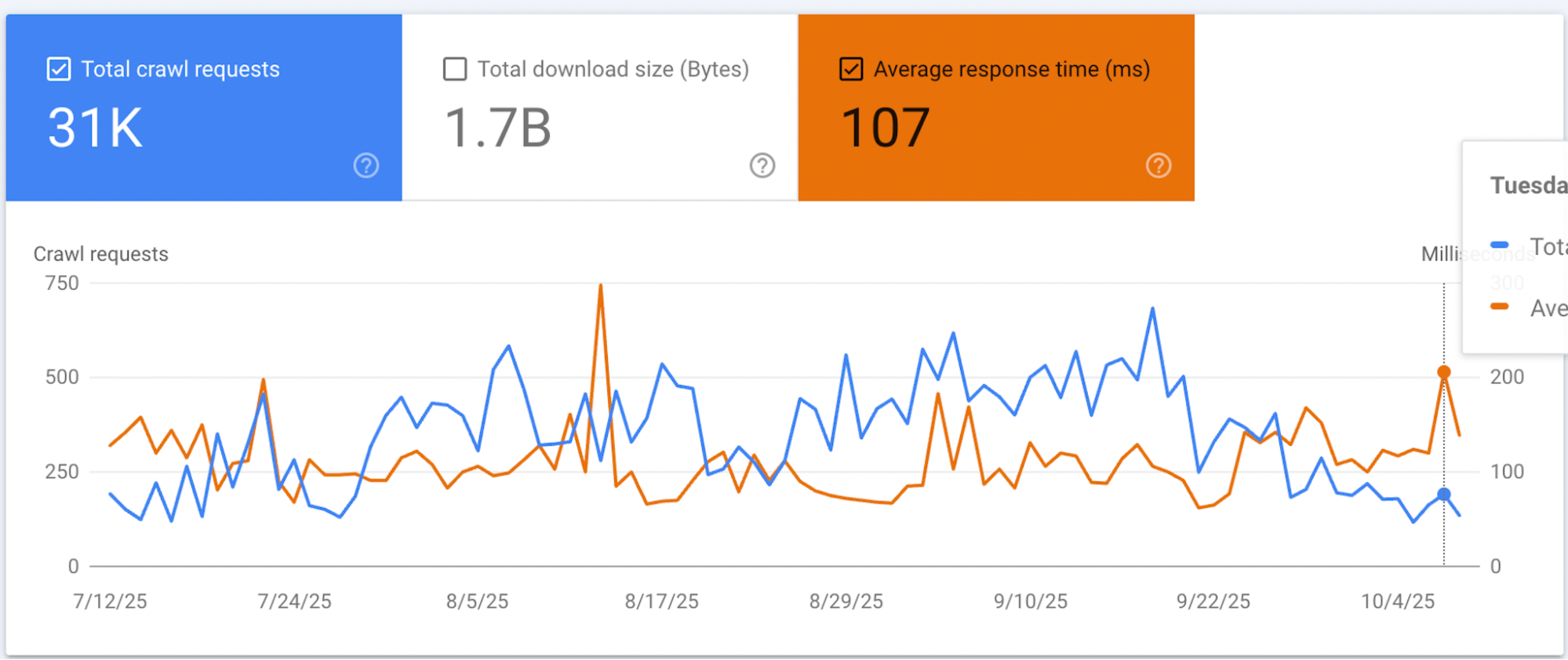
If specified subdomains not needed for indexing, recommended to either block them from indexing in robots.txt or completely remove. - Server Response Time
Necessary to periodically monitor average server response time (Average Response Time) so it doesn't exceed 150 ms. With significant site load this indicator can increase --- in that case need to identify cause and promptly fix problem. - Indexing Errors
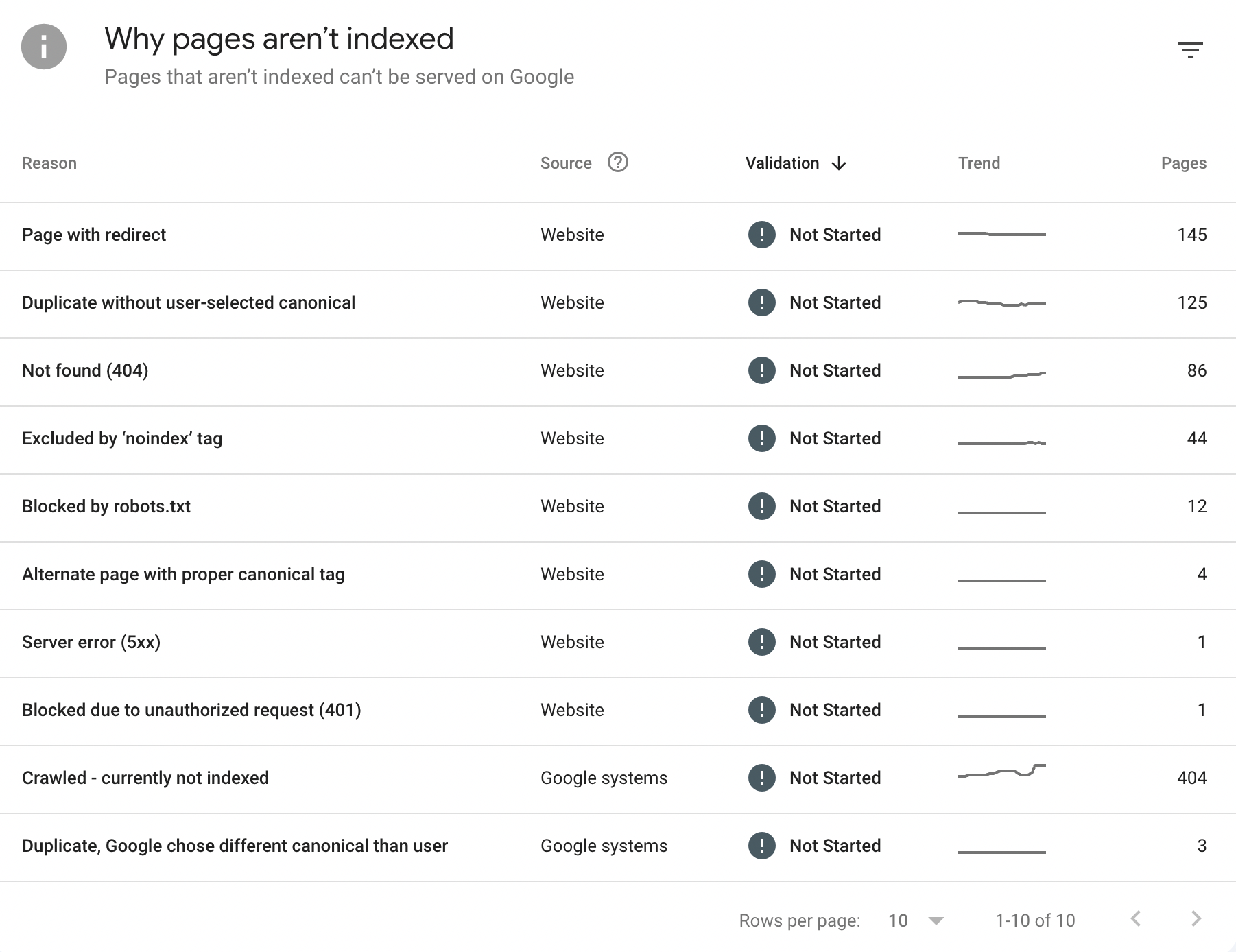
Google Search Console reports show many errors related to site page indexing. Recommended to eliminate these errors as much as possible. Many will disappear after implementing changes described in this audit.
7.2 Traffic Analysis
Status: 🟡 Stable, No Growth
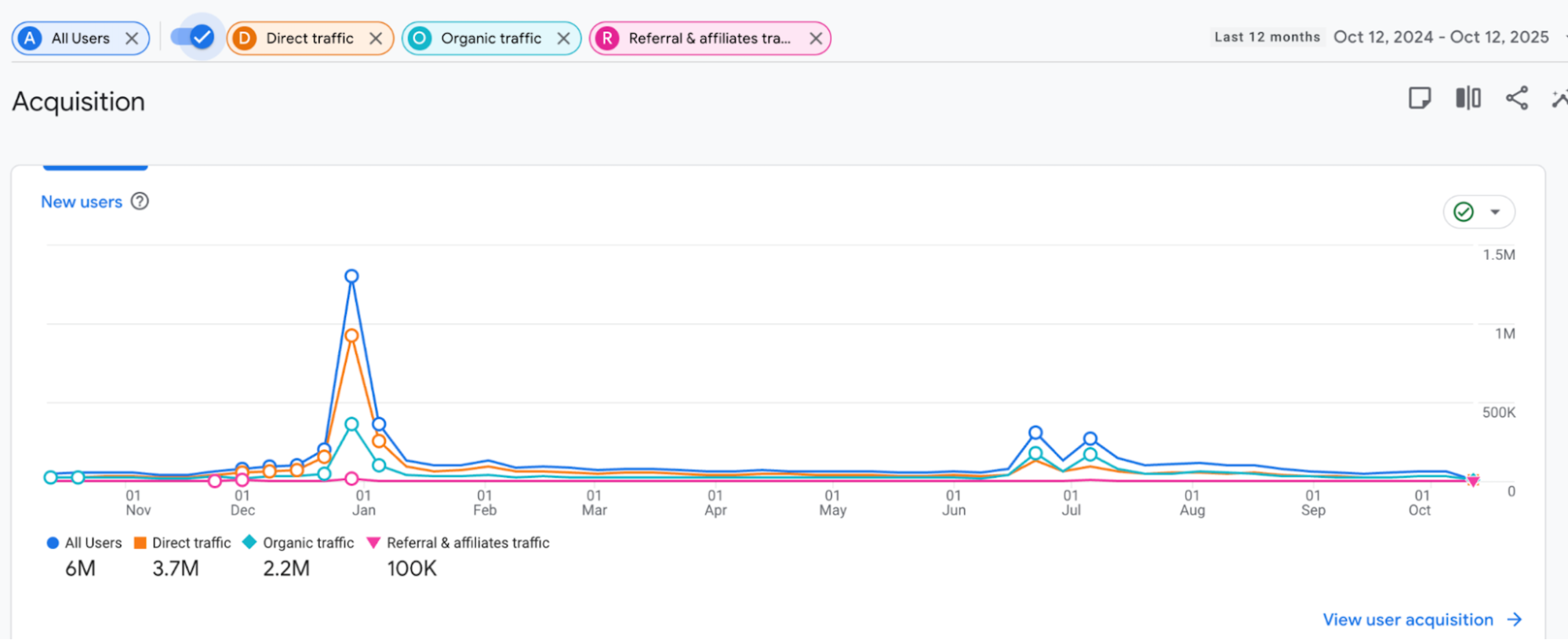
Priority: MEDIUM12-Month Traffic Pattern:
Over past year no pronounced traffic growth observed: traffic decline also absent, there are 3 seasonal peaks after which dynamics stabilize at previous levels. To increase traffic recommend implementing audit fixes, regularly writing content and covering more keyword queries.
Expected Timeline:
- Initial improvements: 4-6 weeks
- Measurable growth: 8-12 weeks
- Sustained increase: 12-16 weeks
7.3 X-country Traffic Analysis
Traffic from X mostly organic or through Direct - which usually includes direct visits, bookmarks and transitions without referrer. Audience behavior looks correct (no obvious session breaks that could worsen behavioral metrics). Organic keyword positions high. Below is screenshot of some keyword queries with their positions in X. Also made export of transitions (referrer site - landing) from metrics over past year for X GEO.
CONCLUSION
During audit of https://example.com/ site identified problems requiring priority elimination to increase search engine visibility, conversion and trust from users and AI. Most critical - closed pricing page and absence of complete Schema markup, directly affecting indexing, trust and conversion.
Critical Findings:
Pricing page (/pricing) unavailable without registration, which is serious barrier for potential customers. This leads to lead loss, decreased trust and worsened AI search positions, where closed content is not indexed. Recommended to open page, add plan comparison table, highlight recommended plan (for example, Pro x), introduce annual subscription with discount and place social proof (reviews, payment system logos). Current mobile version requires increased card size, improved text readability and bright CTA buttons.
Technical and SEO Problems
Found broken links that need to be fixed or redirected. URLs use underscore instead of hyphen, worsening search engine perception; need to rename URLs with 301 redirect setup. Meta Title and Description require optimization: keywords should be at beginning of title, and descriptions should be informative and call to action. Many pages missing H1 headings, violating semantic structure; need to fix heading hierarchy (H1 → H2 → H3). Images loaded from Firebase Storage without CDN, slowing loading; recommended to move them to hosting and optimize (WebP, lazy loading).
Schema Markup and AI Optimization
Missing complete Schema markup on homepage and pricing page critical for AI search. Need to add Organization, WebApplication, MobileApplication and Review Schema to homepage, Offer Schema to pricing page. On article pages should improve Article Schema, adding image, author URL, wordCount and FAQPage Schema. Recommended to create "About us" and "FAQ" pages, and also register example.com in Wikidata to increase AI authority.
Content and Multilingualism
Article content requires expansion to 800+ words, inclusion of long-tail keywords, use cases and internal links. Multilingual implementation violates SEO: when changing language URL doesn't change, and translation happens dynamically, creating content duplicates. Need to implement static URLs for each language (for example, /en/, /es/) with corresponding hreflang tags.
Performance and Security
Mobile loading speed requires improvement; recommended to connect Cloudflare CDN for acceleration and protection. HTTPS configured correctly (A+ rating), meeting best practices. robots.txt file should be updated and sitemap.xml link added, which needs to be created.